

City of Moreno Valley · Emergency Management Alert MoVal — City of Moreno Valley emergency preparedness program

Be Prepared. Be Informed. Stay Connected.

Your one-stop shop for learning to prepare for, respond to and recover from emergencies or disasters — with real-time updates from the City and first responders during significant events.

0 Active Events
0 Population Affected
0 Emergency Shelters Open
24/7 Updates Available
Right Now

Significant Event Information

Significant events are emergencies or disasters that require a response and resources beyond typical day-to-day events — the events that have the potential to negatively impact a large portion of the community.

No Active Significant Events

There are currently no significant events occurring in the City. If there were, you’d find incident information here on emergency shelters, pet evacuations, donations, resources for those affected, and road closure updates.

Looking for information on
day-to-day emergencies in the City?

Visit our partners at CAL FIRE / Riverside County Fire:

  rvcfire.org/incidents

Be Ready

Before Disaster Strikes

Three steps to help you prepare before disaster strikes.

Have a Kit

Assemble a kit from around the house, use what you have, and set a plan to buy what you need a little at a time. Consider dietary needs and preferences for your family.

Build a robust stationary kit for shelter-in-place, plus easy-to-grab GO BAGS for each family member. Keep them near important documents and heirlooms so you can load and go quickly.
Make a Plan

Start by talking with family and friends about “what if?” Talk through scenarios, communication channels, and timelines, then write the plan down in simple terms and share it.

Make sure your plan considers: kids’ pickup, daycare/school expectations, seniors and individuals with disabilities, medical equipment and power needs, times when you’re out of the area, and pets.

Stay Informed

No matter where you live, work, or play, stay informed during emergencies. Register for free alert and warning platforms, and encourage family, friends, daycare providers, etc. to register too.

See the Emergency Alerts section below for the full list of platforms we recommend.

  Items to Consider for Your Emergency Kits

  • Flashlight and batteries (no candles)
  • Hygiene products
  • Food and water
  • Minimum 1 gallon of water per person, per day — plus pets
  • Add extra water for hand washing and hygiene
  • Store water at least 1” off the ground in a cool, dark location
  • Pet food and water
  • Fire-rated safe for important documents (insurance, birth certificates, passports)
  • Basic medical supplies
  • Power sources (generator, portable power supplies)
  • Manual can opener
  • Warm or cool clothing
  • Sleeping bags or blankets
Don’t forget: establish a plan to rotate emergency supplies periodically.
Get Ready, Get Set, Go Now!

Emergency Evacuation Information

Evacuating during an emergency can be scary, but there are steps you can take to prepare yourself, your family, and your pets. Understanding the terminology and process helps reduce stress and anxiety.

Stage 1

GET READY

Before you’re told to evacuate

  1. Know your ZONE — Download the Genasys Protect app (available for iOS and Android).
  2. Grab your GO BAG, important documents and heirlooms, and load them in your car.
  3. Execute your plan — notify family, employer, your emergency contact, etc.
  4. Stay informed — follow official sources.
Stage 2

GET SET

Evacuation Warning — Danger is Near

  1. Load pets, children, loved ones and prepare to leave.
  2. Secure the house — close all windows and doors.
  3. Now is the ideal time to leave; don’t wait!
Stage 3

GO NOW!

Evacuation Order — YOU MUST GO NOW!

  1. Leave — be calm but intentional.
  2. Get out of the area, then determine next steps.
  3. Follow official sources only.
Alternate

SHELTER IN PLACE

It's not safe for you to leave.

  1. Close and secure all doors and windows.
  2. Turn off heating/cooling ventilation systems, if necessary, use fans to stay cool.
  3. Listen to official sources for an "all clear" message.
Plan ahead so it’s not a last-minute scramble:
  • Roads may be congested — don’t wait, go early.
  • Seniors and individuals with disabilities may take longer to prepare; have a plan.
  • Put pets on a leash and in a carrier well before it’s time to go.
Know Before You Go

At the Shelter

Here are some basic things to know about going to an emergency evacuation site. Community members are strongly encouraged to have a plan in place and execute it before going to a shelter, so they have the items needed to be as comfortable or healthy as possible during the evacuation.

  • Workers are doing their best. Shelter staff are providing a safe place to stay during the emergency, often with limited resources in a location not typically used as a shelter. Your patience is appreciated.
  • Food and water will be provided with consideration for dietary restrictions. If you have restrictions (low-sodium, vegetarian, vegan, etc.), tell the shelter staff when you arrive.
  • Bring chargers. Cell phone chargers may or may not be available — bring your own.
  • Download incident apps before you arrive. Staff are focused on shelter operations and may not have the latest updates.
  • If you bring your pet, bring a leash, carrier, and other essentials to keep your pet and others safe.

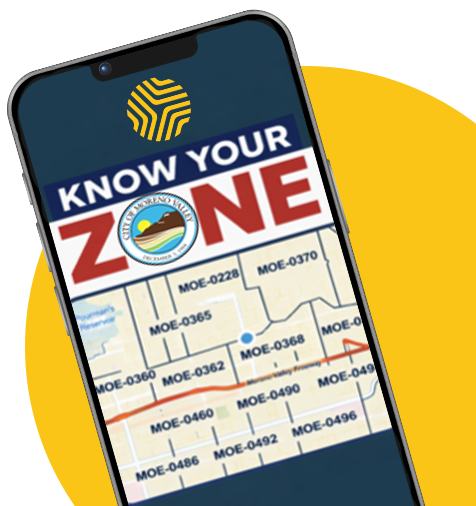
KNOW YOUR ZONE

When you receive an emergency alert, regardless of sender, it will almost always refer to the zones being placed under evacuation warning, evacuation order, or shelter-in-place. Help us spread the message by encouraging family, friends, co-workers, day care providers, and healthcare providers to download the app today!

Know your Zone using the Genasys Protect app available on iOS and Android
Stay Connected

Emergency Alerts

Informing the public about potential or actual emergencies can be challenging due to the number of platforms available. We encourage you to use professional agencies as your primary information source — here are the ones we recommend.

City Notification System

Alert MoVal

The City’s emergency notification system, is supported by the RAVE platform. Like most alert and warning tools, it requires residents to opt in. Once you’re opted in, you may receive City notifications about emergencies and instructions to take specific actions.

May send alerts for actual or potential significant incidents within City boundaries, or rarely, for incidents in surrounding areas that may affect the City.

Register for Alert MoVal
County Notification System

Alert RivCo

The County’s emergency notification system, is supported by Genasys Protect. Useful for residents who travel outside the City for work or vacation — you’ll still receive emergency alerts for incidents within and beyond City boundaries.

Also requires you to opt in. Registration takes only a few minutes.

Register for Alert RivCo
Know Your Zone

Genasys Protect

Available for iPhone and Android, delivering emergency alerts wherever you live, work, or play. Genasys Protect breaks areas into geographic zones — making it easy to KNOW YOUR ZONE.

All areas within the City of Moreno Valley are known as the MOE zones. Enter your address and any addresses you frequent to know yours.

Visit Genasys Protect

What Are:
  Wireless Emergency Alerts (WEA)

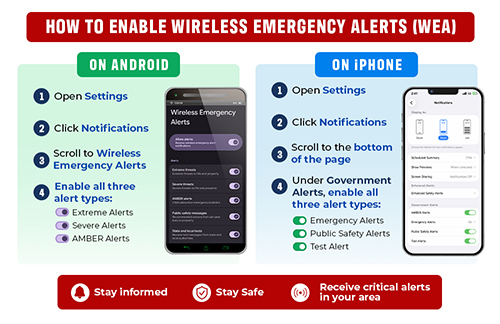
WEA are free, text-like notifications sent by authorized public agencies to cell phones in specific geographic areas impacted by an emergency or disaster. They include National, Imminent Threat, AMBER, and Public Safety messages and require no subscription on WEA-capable devices.

Alerts are broadcast via cell towers (not affected by network congestion) and can be managed in your phone’s settings — though National Alerts cannot be disabled.

WEA messages are up to 360 characters, accompanied by a unique sound and vibration. They are not SMS — they’re broadcast via dedicated technology, so they pop up on your screen even during cellular congestion. They can include clickable links and phone numbers.

Warning:

By turning off alerts in your phone settings, you may miss critical alerts of potential or actual danger.

Avoid turning off these potentially life-saving notifications.

How to enable wireless emergency alerts on iPhone and Android
A Team Effort

Our Partners

Preparing for, responding to, and recovering from emergencies is a team effort. No jurisdiction can be successful on its own — it takes daily coordination, communication, and collaboration with government and non-government entities.

The City collaborates with residents, businesses, faith-based organizations, non-profits, educational institutions, and surrounding cities, tribal partners, utility providers, county, state, and federal agencies through established SEMS and NIMS channels. While impossible to list every partnership, here are a few examples:

Own a business or non-profit and want to learn how you can help prepare for, respond to, or recover from emergencies?

  Email OEM@moval.org
Take Action

Get Involved

Whether you want to attend free training online or in person, or volunteer your time, there are plenty of ways to get involved.

  • Community Emergency Response Team (CERT)

    Local CERT training program for the City of Moreno Valley.

    moval.org/cert
  • American Red Cross Classes

    First aid, CPR, AED, babysitting, and disaster training.

    redcross.org/take-a-class
  • FEMA Free Online Courses

    Independent Study courses on a wide range of emergency management topics.

    training.fema.gov/is
  • Riverside County Emergency Management

    County-wide preparedness training and community education.

    rivcoready.org
During a disaster: it’s difficult for local governments to accept spontaneous volunteers because there’s no mechanism to immediately conduct background checks. The agencies below do accept spontaneous volunteers: You can also find local non-profits accepting volunteers via a quick online search.

Don’t Wait. Sign Up Today.

Seconds count. Get notified the moment something happens in Moreno Valley.